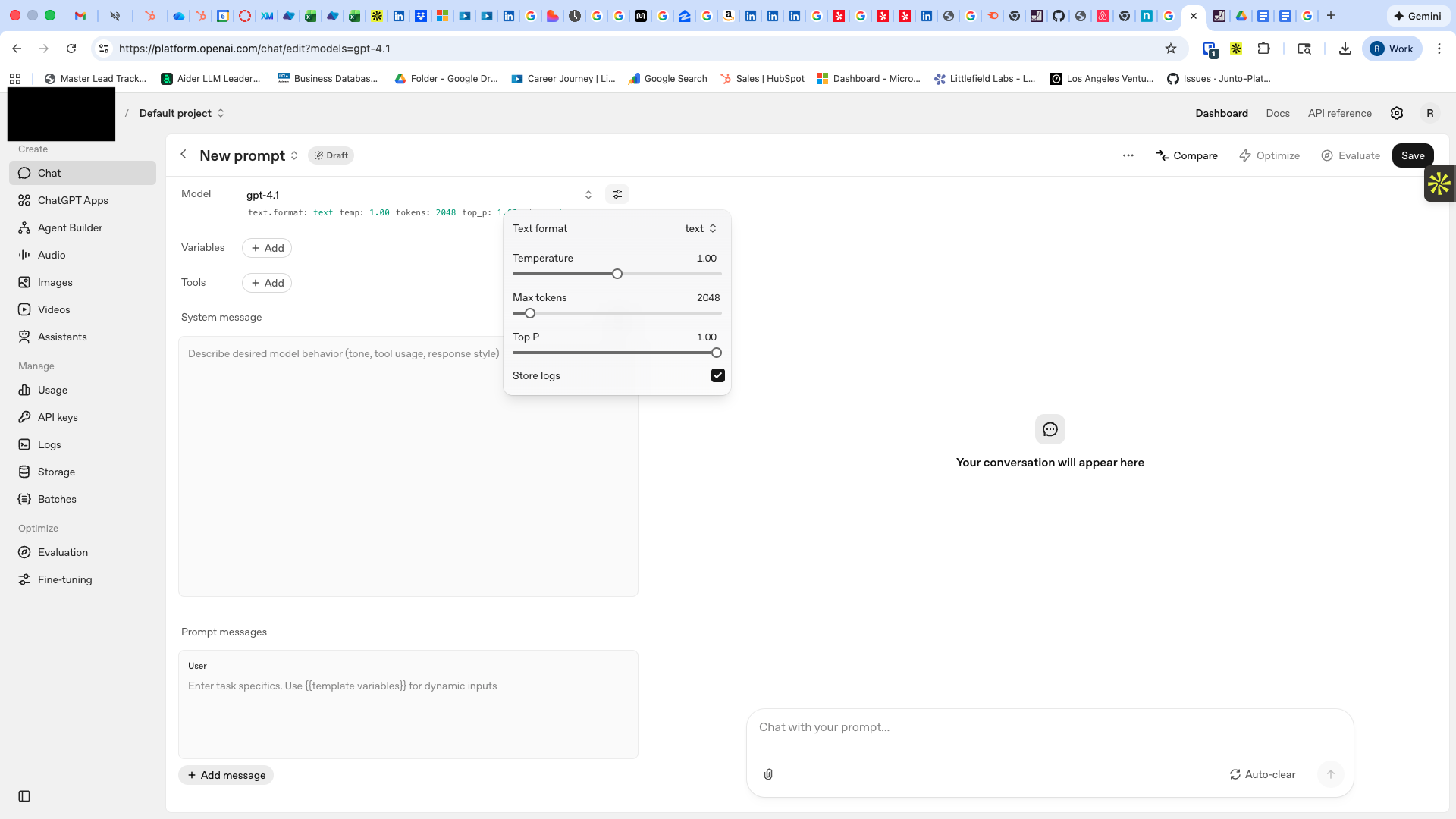
OpenAI Playground is how we started our AI journey for MSPs
We did not start with “build an AI platform.” We started with a simple MSP question:
Can AI help technicians resolve tickets faster, without sacrificing safety or control?
The fastest way to test that was the OpenAI Playground, a low-friction place to experiment with prompts and models before you build anything.
What we found was exciting and frustrating in the same hour. Which brings me to the best phrase I have seen for this era of AI.
The jagged edge of AI
Researchers describe AI’s capabilities as a “jagged technological frontier.” AI can be excellent at some tasks, and then fail at other tasks that look very similar to humans.
That mapped perfectly to MSP work:
- AI can read a messy ticket thread and produce a clean summary.
- AI can scan logs and surface the likely cause.
- Then it can confidently produce a wrong calculation, or assume a detail that is not in the data.
So our mindset became: validate what AI is great at, then build guardrails around everything else.
Why Playground clicked for MSP workflows
The Playground gave us a fast learning loop. We could make small changes and immediately see if the output improved.
The knobs that mattered most:
System message
This is where you set strict rules like:
- Only answer from the data I provide
- Output must be in a ticket note format
- If anything is missing, ask clarifying questions
Temperature and max tokens
For MSP ops, consistency beats creativity most of the time. Lower temperature, shorter outputs, more structure.
Bring your own data
This was the big unlock for MSPs. So much of the truth lives in exports and logs, not in the model’s general knowledge.
The first experiments we ran
Microsoft sign-in logs
We exported sign-in logs and asked the model to do what good engineers already do, but faster:
- Pull the relevant sign-in attempts for a user
- Summarize what matters
- Identify likely blockers, for example Conditional Access
- Recommend safe next steps and what evidence supports them
- Produce a copy and paste ticket note
The results were legitimately useful. Especially for turning raw telemetry into a narrative a tech can act on.
Ninja inventory
We did the same with Ninja exports:
- Which endpoints are missing X
- Which machines have outdated versions
- Group by client and summarize what stands out
Again, the model was great at turning noisy lists into operational summaries.
A hard lesson: do not use AI as a calculator
One thing became obvious quickly. LLMs are language models. They are not a reliable calculator.
If you need totals, rates, billing math, compliance thresholds, or anything you will present to a customer, treat that as code. Hard-code calculations in Python. Let AI interpret and explain the output, but do not let it “do the math” in production.
The real problem: it was too manual to be real
Even when the Playground outputs were strong, it still looked like this:
- Export logs or inventory
- Clean the data
- Paste it into a chat
- Ask the right question
- Copy the answer back into the PSA
- Then go perform the actual action in another tool
That is not a workflow. That is a side quest.
And side quests do not survive a busy service desk.
The MSP multiplier problem: dozens of tools, hundreds of apps
This is where MSPs are different from almost every other IT environment.
An internal IT team might standardize on a small stack. MSPs often support dozens of tools internally, and then interact with hundreds of software applications across client environments.
That creates a brutal math problem for AI adoption.
If every workflow depends on a different portal, API, permission model, and data format, then “just build an AI assistant” turns into building and maintaining dozens of one-off integrations.
Even if you can prove value in the Playground, taking it to production means:
- handling authentication and permissions per system
- normalizing data across vendors and tenants
- writing back into the right system of record
- maintaining integrations as tools change over time
That is a big lift for any MSP, and it is exactly why generic chat tools do not stick. The challenge is not ideas. The challenge is operationalizing them across a wildly heterogeneous stack.
Why “Playground validation” should usually lead to a product
Once you validate that AI can help, the next question is not “can we keep prompting.” It is:
Can we operationalize this safely, consistently, and at scale?
This is where working with a product company becomes the pragmatic choice.
Security is not a bolt-on
Playground is great for learning. Production requires:
- least-privilege access
- role-based controls
- tenant isolation
- data handling rules
- audit logs of what was accessed, and why
Auditability matters in MSP operations
It is not enough to be correct. You need to prove what happened and what changed.
- consistent ticket notes
- system-of-record writeback
- an audit trail of actions and outcomes
Guardrails prevent AI drift
A prompt that works today can break tomorrow because:
- a field changes in an export
- a tech asks the question differently
- the data gets noisier
- model behavior shifts
A product can enforce structured inputs, safe defaults, and consistent outputs.
Going from Playground to production is real engineering
To make AI usable day to day you need:
- reliable connectors and auth
- approval flows
- retries and error handling
- monitoring and alerting
- prompt and runbook versioning
- change management so techs actually adopt it
Without that, it stays a gimmick. Impressive, but not operational.
This is what we are building at Junto
Playground made the value obvious. It also made the limitations obvious.
So we built Junto to bring those capabilities into the workflow technicians already live in.
Junto is an AI helpdesk command center that:
- pulls the right context from your existing tools
- summarizes what matters for the ticket in front of you
- identifies likely causes, for example CA policy blocks for sign-in issues
- recommends next steps and guidance
- executes actions only with technician approval
- writes outcomes back to the system of record
If you have validated AI is helpful, Junto is the “get it into the game” layer.
You can learn more at juntoai.com.
If you are starting your own MSP AI journey
If you are curious, start where we started.
- Pick one high-volume workflow, sign-in issues, onboarding, endpoint remediation
- Export a small, redacted dataset
- Use Playground to test strict prompts and structured outputs
- Document what is still manual, that is where the value is
- When you are ready to operationalize, move from prompt experiments to real workflow integration
That journey is exactly how we got here.
If you want to see what this looks like in a real ticket flow, visit juntoai.com.